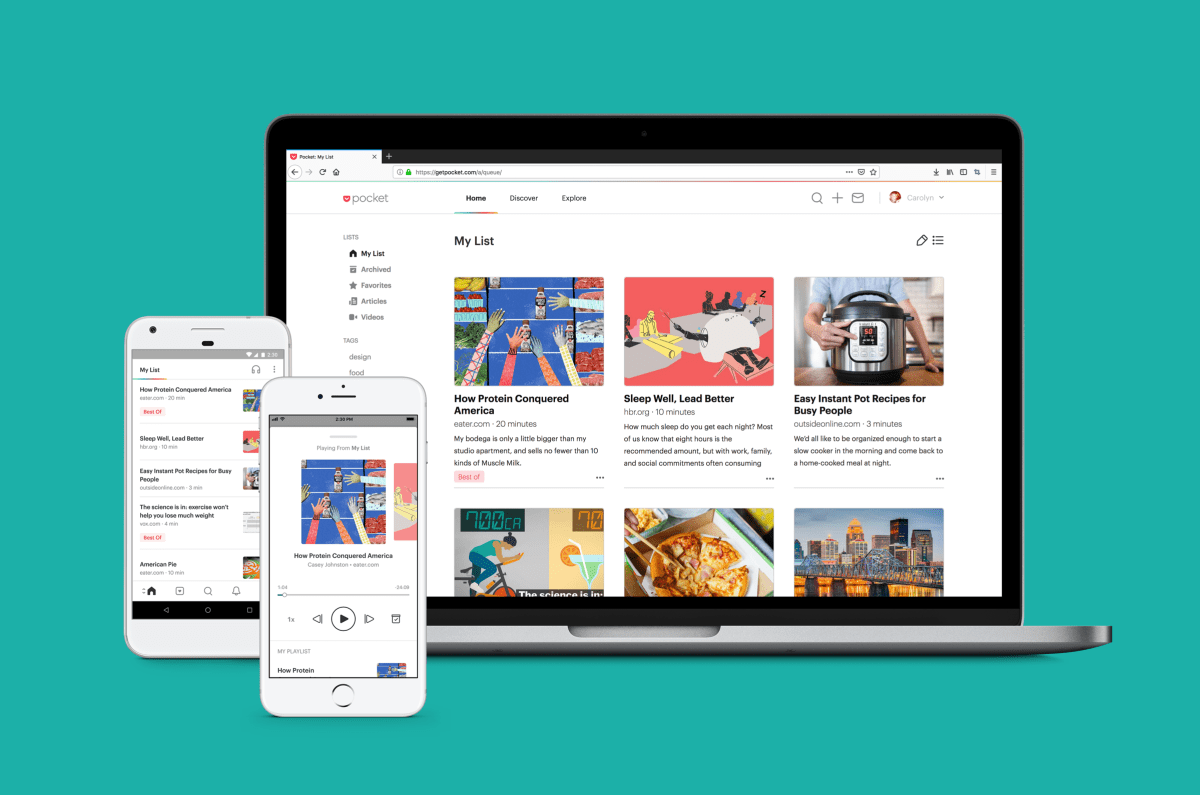
Mozilla 2017 онд худалдан авсан “Pocket” аппликейшнийг 2025 оны тавдугаар сард хаахаа мэдэгдсэн нь вэб хөтлөх арга барил өөрчлөгдөж буйг харуулж байна. Хэрэглэгчид өөрийн хадгалсан нийтлэл, тэмдэглэл болон бусад мэдээллээ 2025 оны аравдугаар сарын 8-ны дотор экспортлох шаардлагатай байв.
Энэхүү шийдвэрийн дараа Matter, Instapaper, Raindrop.io зэрэг аппликейшнүүдийн эрэлт өсөж, хэрэглэгчид өөрийн архиваа шилжүүлэн авч байна. Тухайлбал, Matter нь AI-д суурилсан уншигчийн туслах, Instapaper нь олон жилийн туршлагатай, үнэ төлбөргүй хадгалах боломжтой хувилбаруудыг санал болгож буй бол Raindrop.io нь хавчуурга менежментийн өргөн хүрээтэй үйлчилгээ үзүүлдэг.
Мөн Plinky, Paperspan, Readwise Reader, DoubleMemory, Recall, Wallabag, Readeck, Obsidian Web Clipper, Karakeep, Dewey, Folio болон Burn 451 зэрэг нь өөр өөрийн онцлог бүхий шийдлүүдийг зах зээлд санал болгож байна. Эдгээр аппликейшний ихэнх нь AI-д суурилсан хураангуйлах, тэмдэглэл хөтлөх, офлайн унших болон төрөл бүрийн платформ хоорондын интеграцыг дэмждэг ажээ.
Дэлгэрэнгүйг эх сурвалжаас харах
↓Эх сурвалжийг нээх ↓
In May 2025, Mozilla announced that it was shutting down the popular read-it-later app Pocket, which it had acquired back in 2017 for an undisclosed amount. That led to a growing demand for alternative apps that could help people save online content, particularly longer articles, that they want to read later when they have more time.
While Mozilla exited the business, saying the way people are browsing the web is changing, the shutdown boosted adoption of a number of other apps, like Matter, Instapaper, and Raindrop.io, among others. It’s supporting the creation of new, indie alternatives, as well.
Many of the apps will support imports. However, Pocket users only had until October 8, 2025, to export their saved articles and other items, including lists, archives, favorites, notes, and highlights.
Below are the read-it-later alternatives that are picking up where Pocket left off.
Matter
Matter is a GV-backed company that makes an eponymous iOS app along with browser extensions for Chrome, Safari, and Firefox. The app lets you listen to articles and transcribes your favorite podcasts.
Though the app itself is free to use, you can pay $79.99 per year to unlock features like improved transcriptions for podcasts and YouTube videos, tools to adjust reading speed, and additional integrations with other apps like notes apps, Gmail, and Kindle.
In March 2025, the company also added an AI-powered co-reader to answer questions about different topics users might have while reading an article.
Instapaper
Instapaper, which was founded by developer Marco Arment in 2008, is one of the oldest read-it-later apps. It’s available on both iOS and Android, and lets you save unlimited articles and videos without paying any fees. It was acquired by Pinterest in 2016.

However, for $59.99 per year, you can add notes to saved articles, have a permanent archive of articles in your accounts, create a text-to-speech playlist to listen to stories, enable full text search for all saved items, and get the ability to send articles to your Kindle.
The company allowed Pocket users to import their account into Instapaper. Users who imported this way also received an email offering a three-month free trial to Instapaper Premium.
Raindrop.io
Raindrop works primarily as an alternative bookmark manager for web browsers. However, its accompanying mobile apps for iOS and Android allow you to read your saved articles and PDFs. The free version gives you unlimited bookmark saving along with integrations like Zapier and IFTTT.
If you decide to pay $33 per year, you’ll also get AI-powered suggestions for organizing your content better, full text search, reminders for your bookmarks, a duplicate and broken links finder, and a file upload limit of 10GB per month.

Plinky
Former Twitter engineer Joe Fabisevich created Plinky to allow users to save and categorize any kind of link, including articles, videos, recipes, and memes.
The app is available across all Apple platforms, along with browser extensions to save links. Once you’re signed up, Plinky lets you use folders and tags to categorize your links, and even set reminders to read them at a specific time.
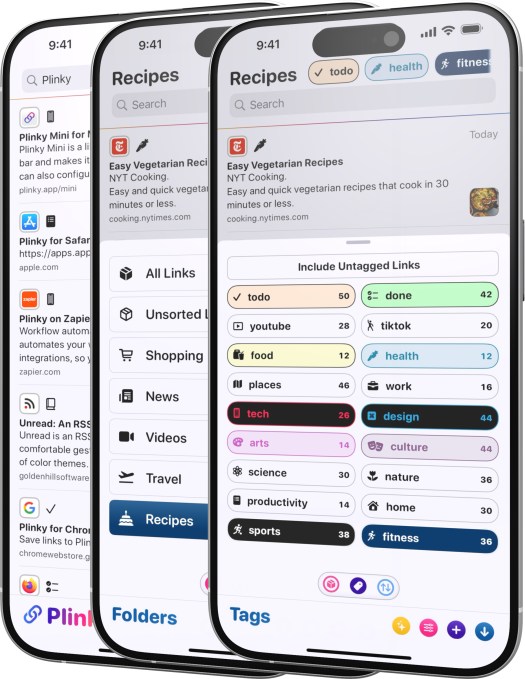
You can save 50 links, create three folders, and use five tags with the free version. To remove these restrictions, you can pay $3.99 per month, $39.99 a year, or a one-time fee of $159.99. Pro users are able to save unlimited links, create an unlimited number of folders, use an unlimited number of tags, and set an unlimited number of reminders.
Paperspan
Paperspan is a very simple app that offers a reading list across devices, allows you to add notes, and has text-to-speech functionality.
The app is free, but it offers an $8.99 per month subscription to unlock advanced search, as well as the ability to create playlists, show reading stats, and send your articles to Kindle.
(Though the app works, PaperSpan hasn’t been updated for some time, which may not be a good signal about its long-term future. The app is available on both iOS and Android.)
Readwise Reader
Readwise, a tool to add notes and highlights to articles, launched its Reader app in 2021. The app allows you to import RSS feeds, YouTube videos, Twitter threads, and more to read at your convenience. Because of its integration with Readwise, the Reader app offers great annotation features. It also features offline text search and an AI assistant.

Plus, you can integrate Reader with knowledge management apps such as Obsidian, Notion, Roam Research, Evernote, and Logseq. The app is free to try for 30 days, and then you have to pay a $9.99 per month Readwise subscription to access it.
Readwise had allowed Pocket users to import their entire Pocket archive into Reader, adding that its app supports a number of features — like PDFs, ePubs, X posts, AI, and filtering — that Pocket never did.
DoubleMemory
DoubleMemory is a newer indie app focused on the Apple ecosystem, offering native apps for both Mac and iOS.
On Mac, you can easily save any link or content by pressing Cmd + C twice. The saved content will then appear in a Pinterest-style tile format.
The app also allows you to read offline and search through text, notes, and tags. You don’t need an account to start using DoubleMemory. And if you have multiple apps, it uses your iCloud account to sync content across them.

DoubleMemory is free with in-app purchases. It offers a $3.99 monthly subscription or an annual subscription of $17.99.
Recall
Recall works as a browser extension and offers a mobile app that allows users to save content from the web, including articles, PDFs, blog posts, podcasts, Wikipedia pages, YouTube videos, and recipes.
However, unlike traditional read-it-later apps, Recall uses AI to automatically summarize content, categorize it, and then resurface it when it’s related to something new you’re looking to learn about.

Designed to enhance your ability to remember information, you can review your summaries from your personal knowledge base on a saved spaced repetition schedule.
Recall is free to try with support for up to 10 free, AI-generated summaries. After that, you can continue to use Recall as a read-it-later tool, or you can upgrade to a $7 per month plan for unlimited AI summaries and other features.
Wallabag
Wallabag is an open-source read-it-later app that is available on major platforms like iOS, Android, and the Web, with support for e-readers like Kindle and Kobo. The app lets you save articles for offline consumption and also export all of your data in PDF, ePUB, .mobi, JSON, CSV, TXT, or HTML formats.

The app has a simple interface and lets you highlight sections and add tags to articles. It also has a reader mode and supports importing data from other services like Pocket, Instapaper, and others.
The app is also available as an €11 per year hosted subscription, if you prefer. The company will use the money to fund its open-source efforts.
Readeck
Open source web app Readeck is designed to help you organize any web content you want to revisit later, whether that’s articles, videos, photos, or anything else. You can also use the service to highlight text, export articles to e-book format, save video transcripts, and more.

Readeck works as a browser extension so you can save your bookmarks as you surf the web. Users can host Readeck themselves, but the company says it will offer a hosted version in 2025. It’s also developing a mobile app.
Obsidian Web Clipper
Obsidian‘s web clipping service lets you highlight and capture web pages you want to save with just a click on its browser extension. You can also use templates that customize how certain types of web pages are saved.
For instance, articles are saved with their citations and footnotes, while recipes will include ingredients, steps, and nutrition. You can even set up custom templates to save from your favorite websites.

As an open source app, Web Clipper is free to use, allowing you to highlight text, images, and blocks of content for saving into the Obsidian note-taking app.
Karakeep
Karakeep‘s bookmarking app lets you save links, notes, and images, and then uses AI to automatically tag items and make retrieving them faster. The app includes other features like support for lists, bulk actions, dark mode, full-text search, and more.

The open source app is available on iOS and Android as a browser extension for Chrome and Firefox. You can support its developer here.
Dewey
Dewey is another “save everything”-style app that lets you save and organize web links, videos, and images, including posts from social media sites like X, TikTok, Bluesky, Threads, Reddit, Instagram, LinkedIn, and others.

The service offers built-in organizational tools like folders and tags, AI bulk tagging, keyboard shortcuts, automatic syncing to Notion, export, a personalized RSS feed, and more. Dewey offers multiple plans, starting at $7.50 per month, which you can choose to pay annually for $30 off.
Folio
Cross-platform app Folio’s design might remind you of Pocket, in part. That may not be an accident, either, as the app’s creator, Nick Chapman, worked at Pocket as head of product.
Folio’s interface is simple and lets you filter articles using the tagged, favorites, short reads, and long reads tabs. You can easily add articles through the Chrome extension, the share sheet, or by manually adding URLs. Plus, it’s easy to import data from other apps like Instapaper.

Currently, the app offers premium features like text-to-speech, highlights, custom fonts, and full-text search for free. It also has a discovery section where you can explore articles to read.
Folio is currently on the web, iOS, and Android.
Burn 451
While a lot of apps allow you to save articles, we all know it is easy to hoard articles and not read them. Burn 451 is trying to change that habit. It will let you save an article, but you have to read or tag it. If you don’t do that within 24 hours of saving the article, it gets deleted.

The app is currently available on the web and iOS. If you use AI tools, the app also offers a model context protocol (MCP) server to reason over reading habits.
Omphalis
Omphalis is an AI-powered consume-it-later app, as you can save articles, documents, podcasts, and videos. The app turns these media into a more comprehensible version by adding a summary, top points, and a chapter-like structure.
The free version gives you limited AI-powered comprehensions, subscribed sources, and transcription minutes. Pro plans starting from $9 per month will get users higher limits and features like key moments recaps and read-alongs.
This is not an exhaustive list, and we will keep adding more tools as we discover them.
When you purchase through links in our articles, we may earn a small commission. This doesn’t affect our editorial independence.